
The Illusion Of Limited Space: Why Your Entryway Isn’t Too Small

Vertical Volume Over Square Footage
You’re afraid your entryway is too cramped to handle a charging station, so you’ve already decided it can’t work. The real mechanism here is dimensional thinking: you’re measuring only floor space when the actual asset is cubic volume. A wall mounted charging station doesn’t consume floor real estate. It consumes wall height, which most small entryways have in abundance but never use strategically.
Small entryways fail not because they lack space but because people treat them like furniture showrooms. The vertical plane from waist height to eye level on any wall can hold a charging dock, cable management, and organizational hardware without competing with a coat rack or shoe bench. Most people leave this zone blank while complaining about clutter on the floor.
Unused Wall Real Estate As Your Hidden Asset
Every wall in your entryway is doing exactly one job or none. The wall next to your door, behind a coat rack, or above a console table likely serves only decorative or single-purpose functions. A wall mounted charging station transforms this dead zone into functional real estate that addresses a daily friction point: people enter with devices that need power and nowhere to put them while they charge.
The mechanism is simple: walls are the only surfaces in a small space that don’t shrink the room visually or physically. Mounted hardware creates vertical hierarchy, draws the eye up, and leaves floor clearance intact. Install your charging station at the point where devices naturally come to rest during entry, typically 48 to 54 inches from the floor, and you’ve solved three problems at once: charging access, device visibility, and cable containment.
Beyond The Hook: The Minimalist Charging Station Design Imperative

Constraint Creates Clarity
You’re worried people will judge your entryway as cluttered or disorganized. The real mechanism here borrows from information theory: every object competing for visual attention reduces the perceived value of the space itself. A wall mounted charging station works like signal-to-noise ratio. Too many cables, too many devices visible, too many charging blocks stacked on a shelf and your brain registers chaos before it registers function.

Minimalism in charging station design isn’t about looking sparse or cold. It’s about removing every element that doesn’t serve the core job: charge devices safely and make them accessible. When you strip away the excess, two things happen. First, the station actually works better because you’ve eliminated friction points. Second, people notice the station exists at all instead of just seeing a mess. One cable per device. One charging block per port. Everything mounted, nothing loose.
Form Serves The Task
Most design advice gets this backwards. It says pick your aesthetic first, then fit function into it. That’s how you end up with a charging station that looks good on Instagram but fails when you actually use it daily. Function comes first in a small entryway because space is already scarce. Your wall mounted charging station solves a specific problem: devices need power, cables need containment, the entryway needs to stay navigable.
The true design principle states this plainly. Choose materials and placement based on what the station must do, not on what trend aligns with your decor. Metal cable management clips hold cables in place and last years. Vertical mounting keeps the floor clear. Neutral finishes age well and work in any entryway. This approach removes the guessing game entirely. You’re not designing an object to showcase taste. You’re engineering a system that works identically whether you notice it or not.
The “Invisible Power” Protocol: Hiding Your Wall Mounted Charging Station
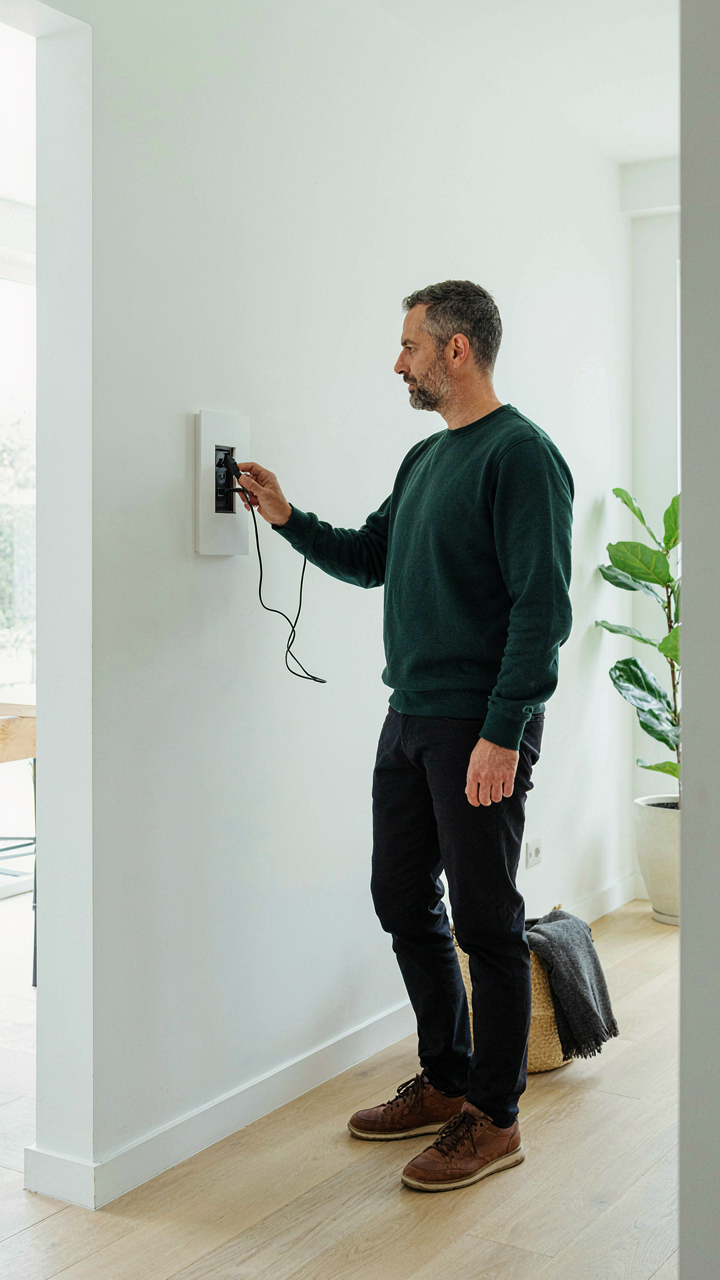
Concealing Cables And Power Bricks
You want your entryway to look intentional, not like a tech support drawer exploded on your wall. The real mechanism here borrows from signal theory: noise is anything that competes for attention. Your cables and power bricks are noise. They scatter visual focus and signal chaos to anyone entering your space.

Route cables behind the wall itself using in-wall conduit rated for low-voltage power runs. Most building codes permit this in residential settings. Run them vertically from the outlet to the charging station mounted above, then drop them down the back side. This eliminates the visible tangle entirely. For the power brick, mount a small recessed box directly behind the station or use a adhesive cable management clip on the rear surface to secure it flush against the wall. Keep the brick out of sight completely.
Built In, Not Bolted On
Standard mounting advice tells you to screw a charging rack to drywall and call it done. That’s incomplete. Real integration means the charging station reads as part of the wall architecture, not an appliance placed on top of it.
Use a recessed charging station designed to sit in a shallow wall cavity. These mount flush with the wall plane, eliminating the protruding profile that screams “I bolted this on.” If your entryway has millwork or trim, align the station width to match existing elements like outlet spacing or architectural details. The mounting depth matters: recess stations 1.5 to 2 inches maximum so they don’t block sight lines or create dust collection pockets. Install it during renovation when you have access to studs. Retrofit mounting always looks temporary.
Dynamic Storage: Modular Phone Charging Station Strategies

Surfaces That Absorb New Devices
You want a charging station that won’t look obsolete in two years. The real mechanism here comes from biology: adaptability. Your wall mounted charging station needs the same principle a chameleon’s skin uses—the ability to shift and adjust to whatever device arrives next without structural failure.

Most people buy a charging station locked into one cable type. That’s strategic weakness. The better move is a modular frame system where you swap charging modules, not the entire unit. This means mounting a neutral backing plate that accepts interchangeable cable holders. When USB-C dominates more fully or you upgrade devices, you replace the module, not the wall installation.
Density Without Chaos
The hive doesn’t build randomly. Every cell serves a purpose. Your charging station should follow iterative design principles: start with your current device count, then add 30 percent capacity overhead for guests and future devices. Build in vertical stacking, not sprawl. This prevents cables from tangling and keeps the entryway from looking like a tech graveyard.
The protocol is simple: measure your entryway wall width, subtract 20 percent for visual balance, then select a modular station that fills 70 to 80 percent of that space. This leaves room to add a second unit or reconfigure later without demolishing drywall. Mount it 48 to 52 inches from the floor. Cable management ties go behind the unit, not visible. Execute this in one afternoon.
The Single Cable Fallacy: Optimizing Multi Device Charger Station Ideas

Prioritize What Actually Needs Power First
You want to feel in control of your entryway, so you treat all devices equally. Stop. The mechanism is simple: not every device drains at the same rate, and not every device matters when you’re leaving the house in five minutes. Your phone needs juice before your smartwatch does. Your laptop before your headphones.

Map this onto triage in emergency medicine. In an ER, doctors don’t treat every patient the same. They route power and attention to what will fail fastest and hurt most. Your wall mounted charging station works the same way. The prime real estate on your station goes to devices that determine whether you leave stranded. Everything else gets secondary placement or no placement at all.
Smart Power Draws Beat Smart Outlets
The advice that smart outlets solve everything is incomplete. They don’t. A smart outlet lets you turn devices off remotely, but it doesn’t change the fact that a hair dryer pulls 1800 watts and your phone pulls 5 watts. You can’t treat both the same way on a wall mounted charging station without cutting other devices’ charging speed in half.
The actual move is to segment by power demand, not by device type. High-draw devices like tablets or laptops need their own circuit or dedicated outlet. Low-draw devices like AirTags or smartwatches can stack on a single multi-port charger. Bundle similar power consumption together. This prevents a single power vampire from starving everything else. When you wire your station, run high amperage cables to outlets designated for devices that truly need speed, then route lower amperage to the multi-port hub handling everything else. This is physics, not preference.
Your Time Is Not Free: The ROI Of A Smart Charging Station Wall

Minutes Saved Are Minutes Earned
You want permission to spend money on something that feels optional. Here’s the truth: every morning you search for a charger, dig through a drawer, or untangle cables is time you don’t get back. Economics calls this opportunity cost—the value of what you could do instead. A wall mounted charging station eliminates search friction entirely. Your devices have a fixed landing zone. You dock them. Done.

The math is blunt. If you waste four minutes daily hunting chargers or cables, that’s 1,460 minutes per year. That’s nearly 25 hours. Over a decade, you lose 250 hours to a problem a wall mounted station solves on day one. Most people never quantify this loss because they don’t track it. You will. Install a proper charging station and measure the time difference in your morning routine. The ROI appears immediately.
Clarity Compounds When Friction Disappears
Removing friction from your physical space removes cognitive load from your mind. This isn’t motivation theory—it’s neuroscience. Your brain allocates resources to every small decision: Where are my keys? Where’s my charger? Where’s my phone? A wall mounted charging station consolidates these into one anchor point. You land everything in the same spot. Your brain stops burning cycles on locating essentials.
The second-order effect is focus. When your entryway doesn’t broadcast disorder, your nervous system enters a calmer state before you leave. When you return, you’re not mentally cataloging what’s missing or misplaced. This isn’t luxury—it’s cognitive efficiency. The charging station becomes infrastructure for mental clarity, not decoration. Place yours at eye level near your door, establish the habit of docking devices immediately, and measure your mental load before and after one week.
Beyond DIY: When To Invest In A Professional Charging Station Design

When Amateur Solutions Cost More Than They Save
You’re hoping a DIY wall mounted charging station proves you don’t need to spend money. That’s the real question hiding here. The mechanism is simple: amateur solutions fail in two ways that professionals prevent. First, they create heat management problems because wiring runs too close together or lacks proper ventilation channels. Second, they mount to drywall without accounting for the weight distribution of multiple devices pulling current simultaneously. A $40 mounting bracket tears out of the wall. A $120 professional installation uses studs, proper gauge wiring, and surge protection that actually works.

The cost of an amateur approach isn’t the initial setup. It’s the replacement hardware when something fails, the time you spend troubleshooting why your phone charges slowly, and the fire risk from poor electrical practices. A professional wall mounted charging station assessment costs nothing to request. Most installers quote over the phone after asking about your device count and power requirements. If the quote exceeds $300, your entryway likely has structural or electrical constraints that make DIY genuinely dangerous, not just inconvenient.
Design Systems Built For Your Actual Devices
Bespoke solutions mean matching your wall mounted charging station to what you actually plug in, not what you think you should plug in. This borrows from systems design in engineering: constraint mapping. You identify every device that needs charging simultaneously, measure their power draw in watts, then specify infrastructure that handles peak load without thermal stress. A phone charger draws 18 watts. A tablet adds 30 watts. A wireless earbud case adds 5 watts. A power bank adds another 30 watts if charging while outputting. Most people stack these without calculating the total draw on a single outlet circuit.
Professional installers ask the questions DIY setups skip. Do you charge during specific times or all day. Do you add devices seasonally. Is your entryway near a bathroom or kitchen where humidity matters. Does your electrical panel have available capacity on that circuit, or do you need a dedicated line. They then specify cable gauges, outlet spacing, and mounting depth based on your answers, not generic product dimensions. This transforms a wall mounted charging station from a convenience into infrastructure that adapts as your device ecosystem changes. The installation protocol includes testing load capacity before finalizing the mount.
Future Proofing Your Mobile Charging Station Organizer Ideas

When Wireless Charging Actually Matters
You’re worried your wall mounted charging station will look dated in two years. The real mechanism here is that wired and wireless charging are not converging—they’re diverging into separate use cases. Wireless charging burns more power to move the same electrons. It solves one problem: eliminating cable wear on phone ports. It creates another: generating heat that degrades batteries faster than wired charging does.

Right now, wired dominates entryways because speed matters when you’re leaving. USB-C and Lightning cables charge faster than any wireless pad. The shift won’t be “everyone goes wireless.” It’ll be “wireless handles low-power devices, wired handles high-draw situations.” Build your station to support both without betting your design on either one winning.
- USB-C standardization: Most new phones and devices now use USB-C, making wired stations more universal than they were five years ago. Design your station around USB-C ports first, not proprietary connectors.
- Wireless pads for accessories: Smartwatches and earbuds benefit from wireless charging pads more than phones do. Reserve a small zone for a wireless pad rather than assuming it replaces all wired charging.
- Fast charging protocols: QC 3.0, PD, and adaptive charging standards evolve yearly. Choose power supplies rated for current standards, not yesterday’s specs, to remain relevant.
- Cable management longevity: Replaceable cable routing and clips matter more than proprietary solutions. Devices change; the ability to swap cables and reorganize should not.
- Multi-device power draw: Modern homes charge five to eight devices simultaneously. Your power supply must handle aggregate load, not just peak single-device charging.
Avoid the trap of over-designing for wireless. Your wall mounted charging station should treat wireless as an optional feature for specific devices, not the foundation of the system.
Design For What You Cannot Yet Name
Scalability in charging infrastructure works like portfolio theory in economics: you build redundancy into the system, not because you need it today, but because you cannot predict which devices matter tomorrow. Most people design for their current phone and two cables. That’s a fixed state, not a system.
Design your mounting system with 40 percent more vertical space than you currently use. Add extra USB ports beyond what your household needs. Install a power supply rated for double your current draw. These investments cost slightly more upfront but eliminate the need to remove and reinstall everything when you add a smart home hub, a second phone, or a tablet charging station. Mount your station so it accepts new cable organizers without requiring wall damage or repositioning. The margin you build today becomes the system’s lifespan tomorrow.
The 80/20 Rule Of Charging Station Effectiveness

The Vital Few Devices, Trivial Many Cables
You’re hoping a wall mounted charging station will finally make your entryway look organized instead of like a electronics graveyard. Here’s the mechanism: most people charge everything because they can, not because they need to. Parkinson’s Law applies here—devices expand to fill available outlets. The entryway doesn’t need six simultaneous charging solutions. It needs the two or three devices you actually grab on the way out the door. Your phone. Maybe a smartwatch or earbuds. That’s the vital few. Everything else is friction disguised as preparedness.

The trivial many are the cables you keep because you “might need them.” The old phone charger. The backup power bank. The laptop cord you never use in that room. These occupy physical space and mental load without adding function. A wall mounted charging station in a small entryway has real estate constraints. You’re not designing for theoretical scenarios. You’re designing for the actual devices your household uses daily in that specific location. Strip the station down to only what gets plugged in on repeat. The rest belongs in a drawer elsewhere or in the recycling bin.
Maximum Essential Charging, Zero Redundant Solutions
Charging redundancy is expensive in small spaces. You don’t need two USB-A ports for the same function if one suffices. You don’t need wireless charging and a wired charging pad for the same device. You don’t need a charging station that handles four phones when one household member uses it. The common advice is to “plan for growth” or “design flexibility.” That’s padding. Small entryways demand honest assessment: what actually plugs in here, and what’s the minimum hardware to charge it efficiently.
Maximize by choosing one primary charging method per device type, then stop. A dual USB-C port configuration covers phone and earbuds for most households. A single 65-watt USB-C power delivery charger replaces a drawer full of legacy adapters. Eliminate the redundant solution immediately. If you install a wall mounted charging station with six ports and use three, you’ve created visual clutter and wasted installation effort. The mechanism is simple: fewer ports force intentional choices about what lives in that space, which is exactly what a small entryway requires.
The Real Obstacle Isn’t Space; It’s Your Addiction To Clutter And Complexity

Your entryway doesn’t need a wall mounted charging station hidden behind clever design. It needs you to stop treating it like a storage unit for every cable and device you own. Most people fail not because their space is small, but because they refuse to make decisions about what deserves a home. Pick one wall today. Mount one charging station. Plug in only what you actually use daily. Everything else gets removed. Your entryway won’t change until you do.